Use Decompiled Bannerlord sources with AI
Set up BL reference sources for GitHub Copilot in Visual Studio
THIS IS A HUGE PRODUCTIVITY BOOST
This method gives the AI full access to the Bannerlord source to explore and analyse, and allows me to save up to 80% of the time I previously spent searching for where and how things are implemented.
Step 1 — Decompile BL files using the script
Run the decompilation script against the Bannerlord game binaries.
Get script here.
(Copy from Noxix Targaryen's script)
Adjust destination folder in the script based on your environment.
Step 2 — Create BLSource in your project folder
Inside your mod project directory, create a dedicated folder BLSource
Step 3 — Copy decompiled files into BLSource
Move the output from Step 1 into BLSource.
Keep the original folder structure so Copilot can navigate namespaces naturally.
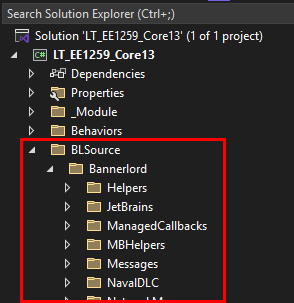
Step 4 — Exclude folder from project in Visual Studio
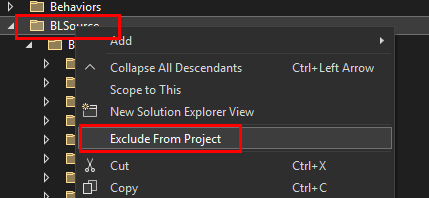
Right-click BLSource in Solution Explorer -> Exclude From Project.
This keeps the files visible on disk (and to Copilot) without polluting your build — VS won't try to compile them.
Step 5 — Done
Your project tree now contains readable BL source as a silent reference layer. No build errors, no extra dependencies.
Step 6 — Ask Copilot to explore BLSource
GitHub Copilot indexes local files in your workspace. Example prompts:
- "In /BLSource, how does
MissionAgentSpawnLogicdecide spawn positions?" - "Find the base class for campaign behaviors in /BLSource and explain the tick pattern."
- "How does settlement loyalty decay work in /BLSource?"
Looks like this:
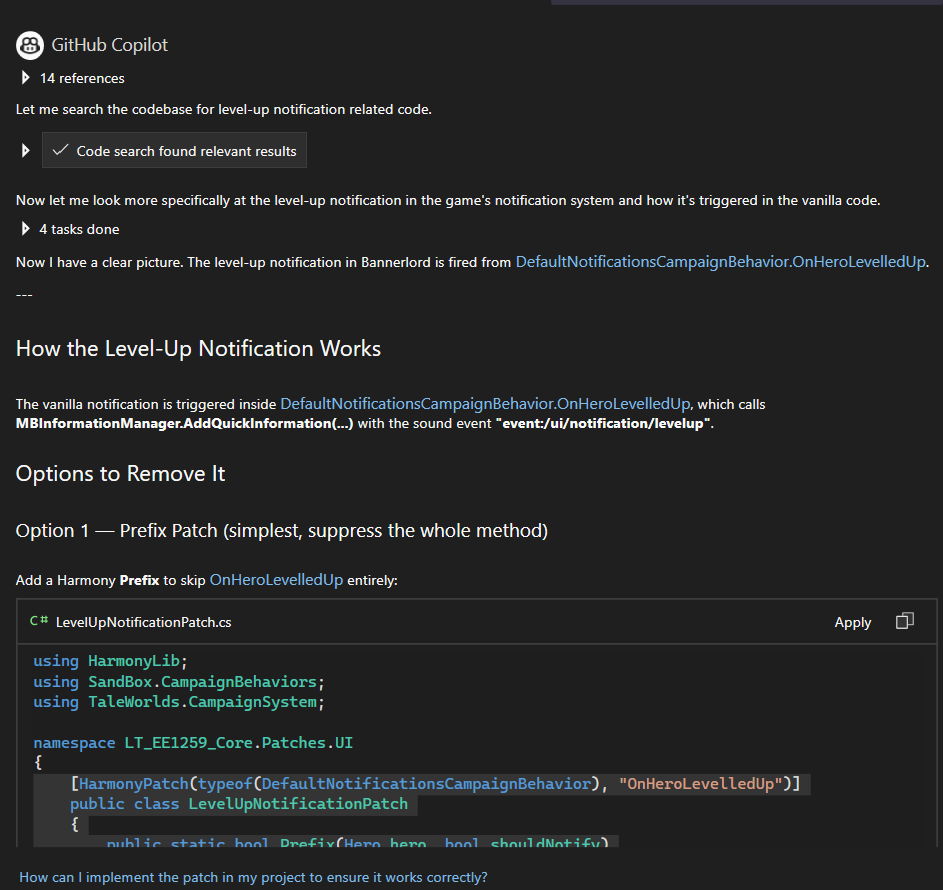
Github Copilot
It's worth every cent: