Textures
Names
_d, _n, and _s are a convention, not a requirement. A material slot will take any texture you assign.
Use the suffixes anyway. On import, the Resource Browser reads the ending and sets the compression and the map type:
| File | Map | Slot |
|---|---|---|
name_d |
Diffuse / base color (sRGB) | DiffuseMap |
name_n |
Normal map | NormalMap |
name_s |
Specular / gloss / metallic | SpecularMap |
pbr_shading and pbr_metallic both sample those three slots. pbr_metallic is the metallic workflow. If the three files share one name, choosing the _d in DiffuseMap fills NormalMap and SpecularMap for you. See Assign Textures.
On the _s map, red is metallic, green is smoothness, and blue is ambient occlusion. See Import Textures.
Put textures on a model
- Import the
_d,_n, and_sfiles into the module's Assets in the Resource Browser. - Open the material.
- Set the shader to
pbr_shading, or topbr_metallicwhen the_smap is metalness. - Assign
_dtoDiffuseMap,_ntoNormalMap, and_stoSpecularMap. Names that do not match still work if you pick each slot yourself. - Under Material Shader Flags, turn on
use_specular. Under Vertex Layout, turn on Bumpmap, and Skinning when the mesh is skinned (armor, clothing). The Set Settings screenshot lists both checkboxes. - Save the material and the mesh.
Resize the texture on the object
Byako: you can if the texture scaler flag is activated on the material, then you can scale it with x/y on vector 2 arguments

Then in your game entity you can customize as needed:

You can also use z/w to displace the material.
I get "unable to save material" if i try to set anything diffrent on it and "save"
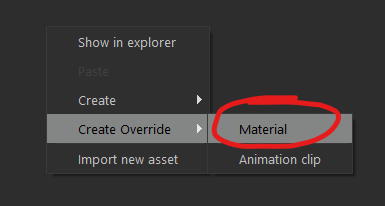
If it's a native material, you need to override it in the resource browser. Though in that case you'll need to publish the assets files along your scene.