Custom Faction in Custom Battle
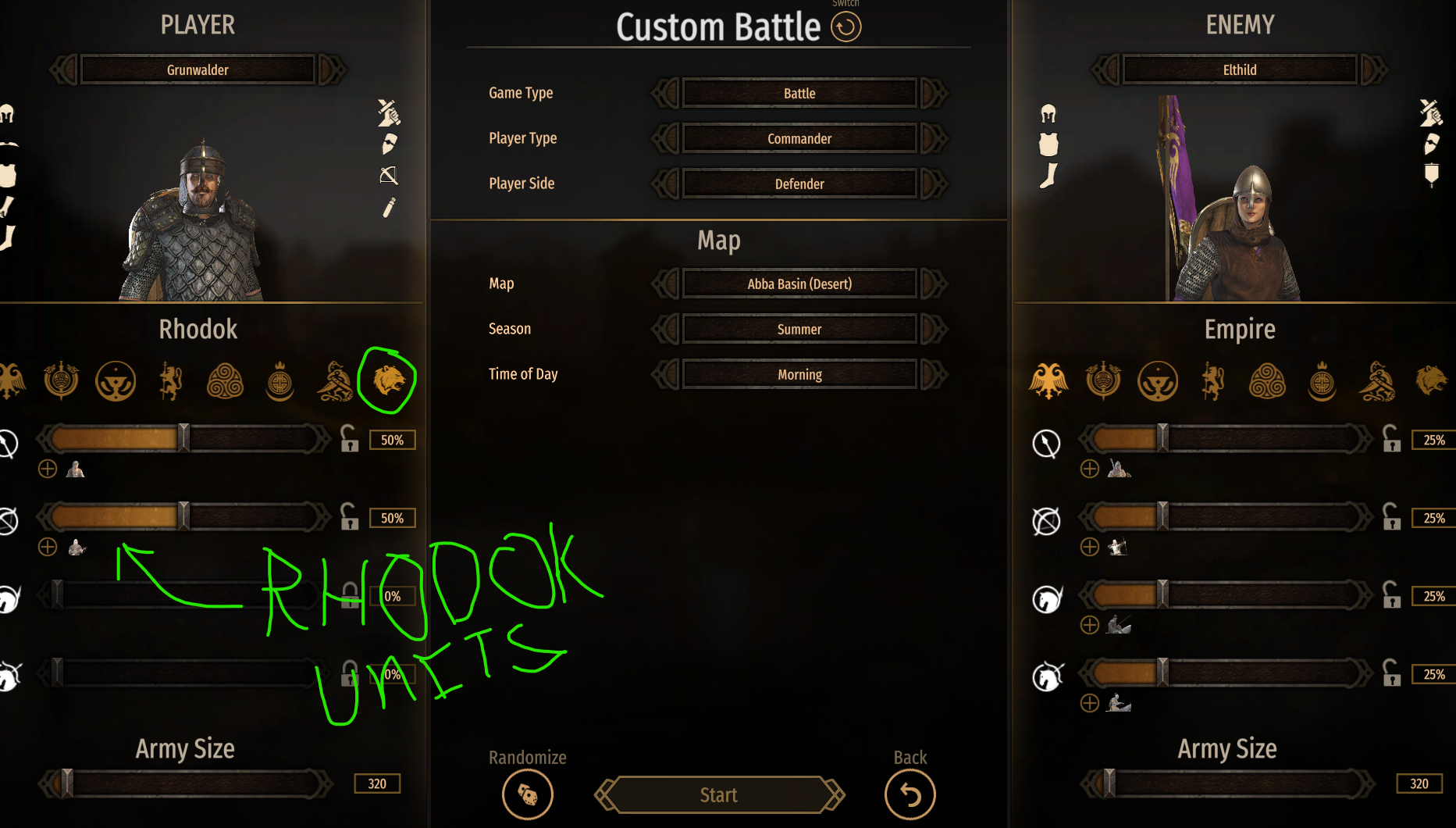
How to make a custom culture selectable as a faction in Custom Battle — with its own commander(s), optional ships, and a proper faction crest (icon). Covers the standard land Custom Battle and the Nightmare Sails / NavalDLC Naval Custom Battle.
Verified on
Bannerlord 1.4.x; the naval parts target NavalDLC (Nightmare Sails). The technique (Harmony-patching the hard-coded lists + a faction-icon brush) is version-independent; only exact type names may shift between versions.
The symptom
You define a culture, a lord, and (optionally) ships in XML. They load fine — but your faction never appears in the Custom Battle faction row, and nothing you change in XML makes it show up. If you do get it to appear, its crest is blank.
There are two separate problems here, solved in order:
- The faction/commander/ship lists are hard-coded in compiled C# — XML can't add to them.
- The faction crest is drawn by a brush, and there's no brush for your culture.
Part 1 — Getting the faction into the list
Why XML doesn't work
Both Custom Battle screens read their lists from static iterator getters baked into compiled assemblies, not from XML or a culture flag:
| Screen | Type (full name) |
|---|---|
| Land (base game) | TaleWorlds.MountAndBlade.CustomBattle.CustomBattle.CustomBattleData |
| Naval (NavalDLC) | NavalDLC.CustomBattle.CustomBattle.NavalCustomBattleData |
Each exposes these property getters the selection view-models read directly:
| Getter | Returns | Used for |
|---|---|---|
Factions |
IEnumerable<BasicCultureObject> |
the faction row |
Characters |
IEnumerable<BasicCharacterObject> |
selectable commanders |
ShipHulls |
IEnumerable<ShipHull> |
the ship picker (naval only) |
Because they're compiled, you add your objects by Harmony-postfixing each getter and Concat-ing your objects onto the result.
Even the land list is hard-coded
A culture's is_main_culture flag does not add it to Custom Battle. The land CustomBattleData.Factions getter is its own hard-coded list and must be patched too.
Step 1 — Define the objects in XML
These are resolved by id at runtime, so they must exist:
- The culture (
spcultures.xml), e.g. StringIdmyculture. - At least one commander — a hero/character (
lords.xml, aBasicCharacterObject) with its culture set to yours. The commander screen filters by the picked faction's culture, so your commander only appears when your faction is selected. - (Naval) any ship hulls you want in the picker.
Step 2 — The append postfixes
One tiny postfix per getter:
public static void AppendFaction(ref IEnumerable<BasicCultureObject> __result)
{
    var c = MBObjectManager.Instance?.GetObject<BasicCultureObject>("myculture");
    if (c != null) __result = __result.Concat(new[] { c });
}

public static void AppendCommander(ref IEnumerable<BasicCharacterObject> __result)
{
    var hero = MBObjectManager.Instance?.GetObject<BasicCharacterObject>("commander_25"); // your lord id
    if (hero != null) __result = __result.Concat(new[] { hero });
}

public static void AppendShips(ref IEnumerable<ShipHull> __result) // naval only
{
    var hull = MBObjectManager.Instance?.GetObject<ShipHull>("myculture_heavy_ship");
    if (hull != null) __result = __result.Concat(new[] { hull });
}
Patch the property getter, e.g. AccessTools.PropertyGetter(dataType, "Factions"). The land type has no ShipHulls getter — PropertyGetter returns null there, so just skip it.
Step 3 — Resolving the type (the traps that eat days)
Three non-obvious traps
1. The final namespace segment is DOUBLED. Assembly is X.Y.Z, but the namespace is X.Y.Z.Z — note the repeated CustomBattle:
NavalDLC.CustomBattle.CustomBattle.NavalCustomBattleDataTaleWorlds.MountAndBlade.CustomBattle.CustomBattle.CustomBattleData
Drop one CustomBattle and GetType/TypeByName silently returns null.
2. Use Assembly.GetType(fullName, false), NOT AccessTools.TypeByName. TypeByName falls back to Assembly.GetTypes(), which throws ReflectionTypeLoadException at menu time and can drop the type even when it's present.
3. Timing / load order. The NavalDLC custom-battle assembly may not be loaded when your OnSubModuleLoad runs, so patching there silently no-ops. Patch from OnBeforeInitialModuleScreenSetAsRoot (fires once after every module's OnSubModuleLoad, before the main menu), and arm AppDomain.CurrentDomain.AssemblyLoad to catch a target whose assembly loads later.
Step 4 — Wiring it up
internal static class CustomBattleFactionPatch
{
    static readonly string[] Types = {
        "NavalDLC.CustomBattle.CustomBattle.NavalCustomBattleData",
        "TaleWorlds.MountAndBlade.CustomBattle.CustomBattle.CustomBattleData",
    };
    static Harmony _h;
    static readonly HashSet<string> _done = new HashSet<string>();

    public static void Register(Harmony h)
    {
        _h = h;
        if (TryPatchAll() >= Types.Length) return;
        AppDomain.CurrentDomain.AssemblyLoad += (s, e) => TryPatchAll(); // catch late-loaders
    }

    static int TryPatchAll()
    {
        foreach (var name in Types)
        {
            if (_done.Contains(name)) continue;
            var t = FindType(name);
            if (t != null) Patch(t, name);
        }
        return _done.Count;
    }

    static Type FindType(string fullName)
    {
        foreach (var asm in AppDomain.CurrentDomain.GetAssemblies())
            try { var t = asm.GetType(fullName, false); if (t != null) return t; } catch { }
        return null;
    }

    static void Patch(Type t, string name)
    {
        if (!_done.Add(name)) return;
        var f = AccessTools.PropertyGetter(t, "Factions");
        if (f != null) _h.Patch(f, postfix: new HarmonyMethod(typeof(CustomBattleFactionPatch), nameof(AppendFaction)));
        var c = AccessTools.PropertyGetter(t, "Characters");
        if (c != null) _h.Patch(c, postfix: new HarmonyMethod(typeof(CustomBattleFactionPatch), nameof(AppendCommander)));
        var s = AccessTools.PropertyGetter(t, "ShipHulls"); // naval only; null on land
        if (s != null) _h.Patch(s, postfix: new HarmonyMethod(typeof(CustomBattleFactionPatch), nameof(AppendShips)));
    }

    // ...FindType + the three Append* postfixes from Step 2
}
Call CustomBattleFactionPatch.Register(new Harmony("yourmod.custombattle")) from OnBeforeInitialModuleScreenSetAsRoot.
Your faction is now selectable — but its crest will be blank. On to Part 2.
Part 2 — The faction crest (icon)
Why it's blank
The faction-select button (MultiplayerLobbyClassFilterFactionItemButtonWidget) does not look up a sprite by culture. It applies a brush named:
…where <Culture> is the culture StringId with a leading capital (empire → Empire, myculture → Myculture). The native cultures define these brushes in Native/GUI/Brushes/MPLobby.xml; NavalDLC adds .Nord in Naval.xml. If the brush for your culture is missing, the widget falls back to DefaultBrush and the icon is blank — with no error.
Step 1 — The icon sprite (52×52)
Add a 52×52 transparent PNG as a sprite part; the folder path becomes the sprite name:
GUI/SpriteParts/<your_category>/StdAssets/FactionIcons/ButtonIcons/<culture>.png
   → sprite:  StdAssets\FactionIcons\ButtonIcons\<culture>
Run the SpriteSheetGenerator, import the texture in the editor, and publish.
Step 2 — The brush
Add a loose brush file, e.g. GUI/Brushes/MyCultureFactionButton.xml:
<Brushes>
  <Brush Name="MPLobby.ClassFilter.FactionButton.Myculture" BaseBrush="MPLobby.ClassFilter.FactionButton" TransitionDuration="0.1">
    <Layers>
      <BrushLayer Name="Default" Sprite="StdAssets\FactionIcons\ButtonIcons\myculture" />
    </Layers>
  </Brush>
</Brushes>
- The brush Name must be
MPLobby.ClassFilter.FactionButton.+ StringId with a leading capital. BaseBrushlives in Native, so your module must load after Native.- Brush files are loose → a brush-only change needs just a game restart (no publish/generator).
XML comments must never contain a double hyphen --
A -- inside an XML comment is illegal and silently invalidates the whole file, so the brush never loads and you get no error. This is an easy way to spend an evening on a "blank icon" with nothing wrong but a comment.
Step 3 — Make the icon's texture resident
Native faction icons live in ui_group1, an always-resident category, so they're in memory the instant the row builds. Your icon is in your own mod category — and a mod category's <AlwaysLoad /> flag does not actually make it resident at startup (it binds the texture during SpriteData init, before the UI resource context exists). Force-load it once the UI is live:
protected override void OnBeforeInitialModuleScreenSetAsRoot()
{
    base.OnBeforeInitialModuleScreenSetAsRoot();
    var sd = UIResourceManager.SpriteData;
    if (sd?.SpriteCategories != null
        && sd.SpriteCategories.TryGetValue("<your_category>", out var cat)
        && cat != null && !cat.IsLoaded)
    {
        cat.Load(UIResourceManager.ResourceContext, UIResourceManager.ResourceDepot);
    }
}
Debugging
GauntletUI does not log missing sprites or brushes, so guessing is brutal. Patch the widget to log what it's doing instead. Harmony-postfix the Culture setter of MultiplayerLobbyClassFilterFactionItemButtonWidget and write to a file: the Culture value it received, its resulting Brush.Name (via reflection), and whether your brush resolves (UIResourceManager.BrushFactory.GetBrush(name)). The decisive line looks like:
Culture='myculture'  Brush=DefaultBrush     <- fell back: brush missing
brushMyculture=NULL                          <- your brush didn't load (bad name or invalid file)
For Part 1, log which *CustomBattle* assemblies are loaded, whether each type was found, and whether each Append* fired — that tells you instantly whether it's a wrong type name vs. patching too early.
TL;DR
- The faction/commander/ship lists are hard-coded C# — Harmony-postfix
(Naval)CustomBattleData.Factions/Characters/ShipHullsandConcatyour objects. - Type full names have a doubled final namespace segment; resolve with
Assembly.GetType(notTypeByName); patch inOnBeforeInitialModuleScreenSetAsRoot+ anAssemblyLoadfallback. - The crest is a brush
MPLobby.ClassFilter.FactionButton.<CapitalizedStringId>→ yourButtonIcons\<culture>52×52 sprite. - Force-load your sprite category in C# (mod
AlwaysLoadis a no-op for residency). - Never put
--inside an XML comment.