Use Decompiled Bannerlord sources with AI
DO NOT USE GITHUB'S COPILOT. IT'S TOTAL CRAP/SCAM. USE CURSOR OR CLAUDE INSTEAD.
THIS IS A HUGE PRODUCTIVITY BOOST
This method gives the AI full access to the Bannerlord source to explore and analyse, and allows me to save up to 80% of the time I previously spent searching for where and how things are implemented. Actually I am lying. It saves me 100% of time. I don't remember when I searched something in the BLs code.
Step 1 — Decompile BL files using the script
The batch script calls ilspycmd for every Bannerlord DLL. Install that tool first so it is available from the command line.
Install ilspycmd
- Install the .NET SDK (includes the
dotnetCLI). Currentilspycmdon NuGet targets .NET 10; use an SDK that can run that tool. - Install the global tool (NuGet: ilspycmd, ILSpyCmd README):
- Make sure the global-tools folder is on your
PATH(required forilspycmdto work in cmd/PowerShell):
| OS | Default install path |
|---|---|
| Windows | %USERPROFILE%\.dotnet\tools |
| Linux / macOS | $HOME/.dotnet/tools |
On Windows, the .NET SDK installer usually adds that folder to PATH. If a new terminal still says ilspycmd is not recognized, add %USERPROFILE%\.dotnet\tools to your user PATH and open a new terminal.
On Linux / macOS, add $HOME/.dotnet/tools to PATH in your shell profile (for example ~/.bashrc or ~/.zshrc) if it is not already there. See dotnet tool install.
- Verify:
To update later: dotnet tool update --global ilspycmd.
Run the decompile script
Get script here.
(Copy from Noxix Targaryen's script)
Adjust destination folder in the script based on your environment. Set BANNERLORD_GAME_DIR to your game install (the folder that contains bin\Win64_Shipping_Client).
Step 2 — Create BLSource in your project folder
Inside your mod project directory, create a dedicated folder BLSource
Step 3 — Copy decompiled files into BLSource
Move the output from Step 1 into BLSource.
Keep the original folder structure so AI can navigate namespaces naturally.
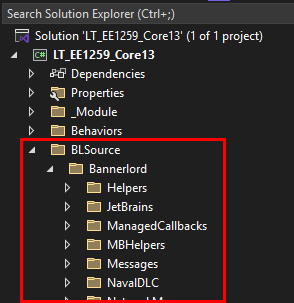
Step 4 — Exclude folder from project in Visual Studio
Right-click BLSource in Solution Explorer -> Exclude From Project.
This keeps the files visible on disk (and to AI) without polluting your build — VS won't try to compile them.
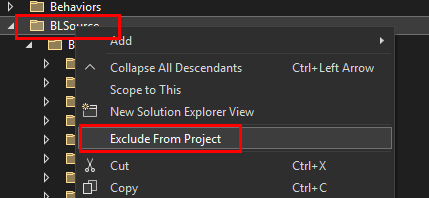
Step 5 — Done
Your project tree now contains readable BL source as a silent reference layer. No build errors, no extra dependencies.
Step 6 — Ask AI to explore BLSource
AI indexes local files in your workspace. Example prompts:
- "In /BLSource, how does
MissionAgentSpawnLogicdecide spawn positions?" - "Find the base class for campaign behaviors in /BLSource and explain the tick pattern."
- "How does settlement loyalty decay work in /BLSource?"
Looks like this:
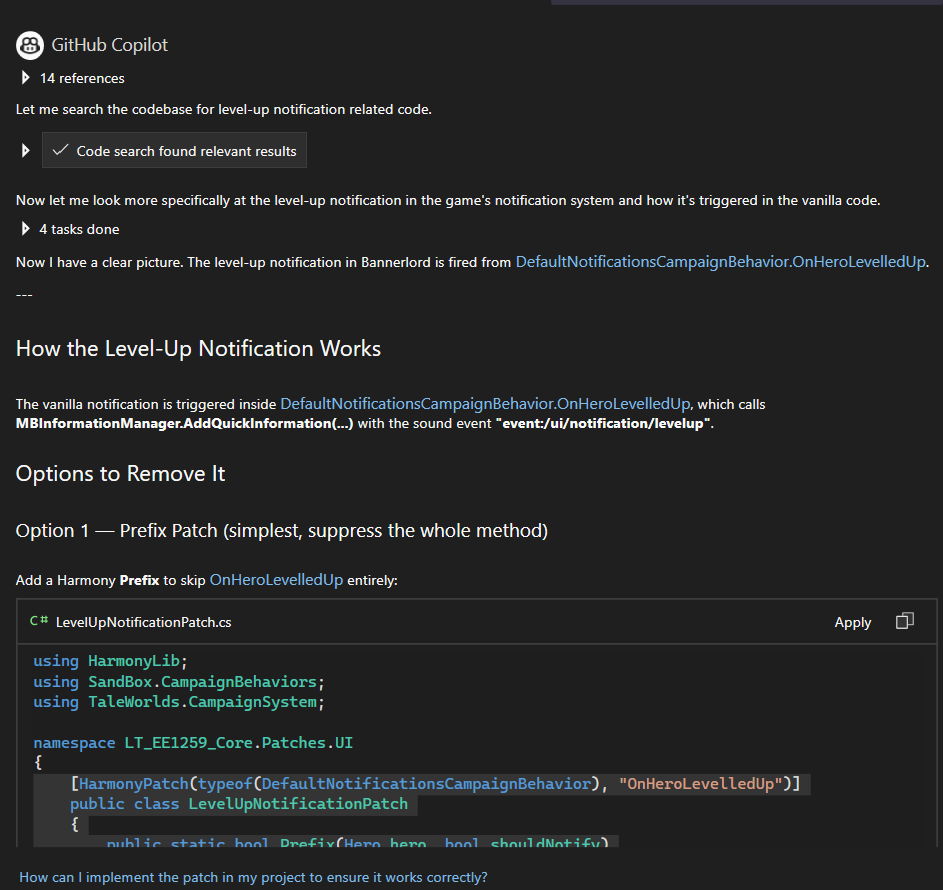
Github Copilot
UPDATE 2026-05-25
Copilot in VS Studio is crap. Better solution is to use Cursor/Claude.